
Características #
- This product is made by 2.4G wireless transmitting technology with low consumption and strong ability to resist signal loss.
- 5 kinds of output mode support 5 led strip (Single color/CCT/RGB/RGBW/RGB+CCT)
- Compatível com controle remoto 2.4G.
Parâmetros #
| Modelo n. | iH5 | iM5 |
| Nome do produto | 2.4G 5 in 1 LED Controller (20A) | 2.4G 5 in 1 LED Controller (12A) |
| Entrada | DC12V-24V | DC12V-24V |
| Saída | 8A/Canal | 6A/Canal |
| Produção total | Máx. 20A | Máximo 12A |
| RF | 2,4 GHz | WiFi+2,4GHz |
| Distância de controle | 30m | 30m |
| Temperatura de trabalho | -20~45°C | -20~45°C |
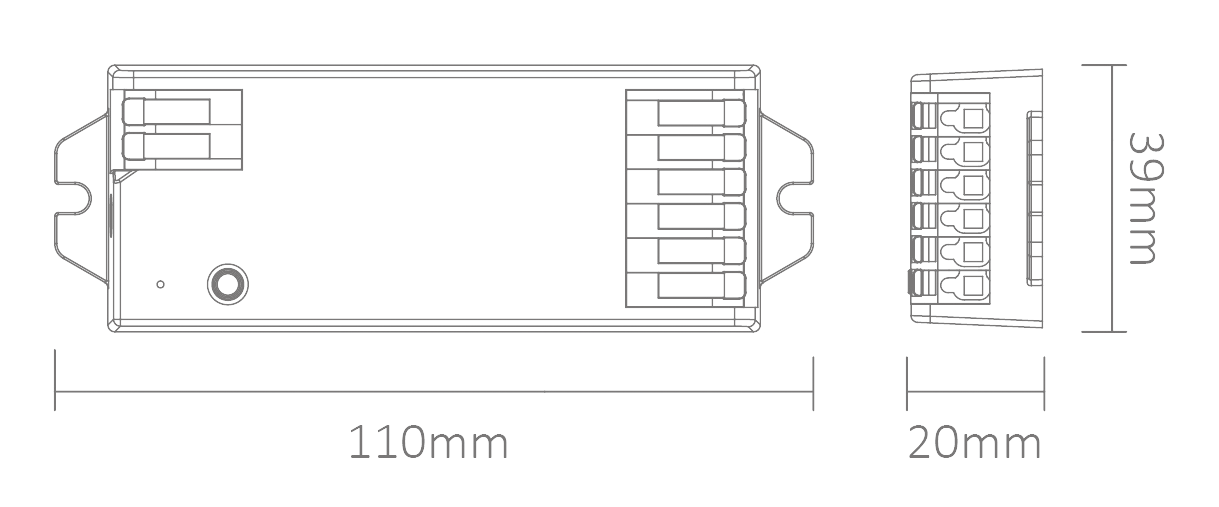
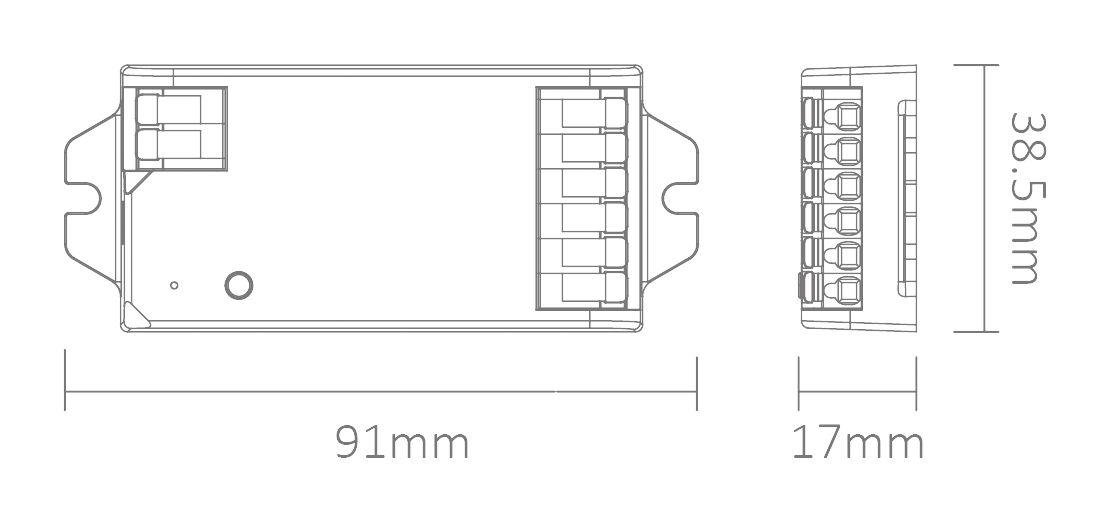
| Tamanho do produto | 110*39*20mm (C*L*A) | 91*38,5*17mm (C*L*A) |
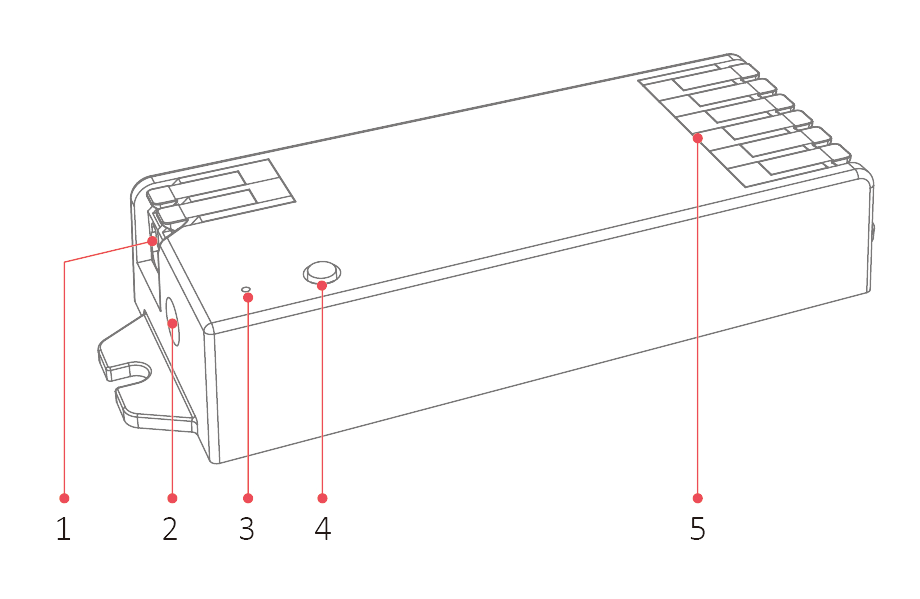
Entrada 1
Entrada 2 (DC5521 Máx. 10A)
Indicador
Botão CONFIGURAR
Saída
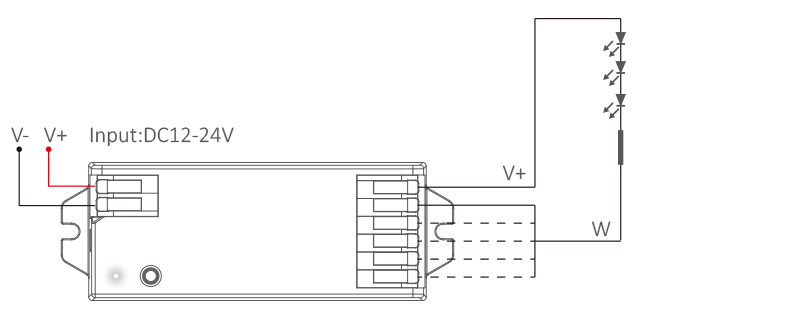
Esquema de ligação #
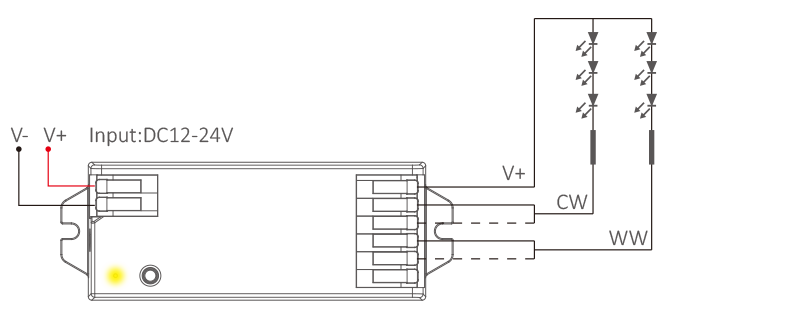
For single color led strip (short press “SET”–white indicator)
For dual white led strip (short press “SET”– yellow indicator)
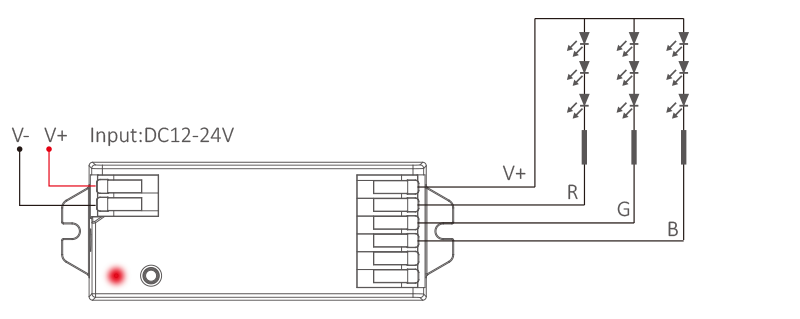
For RGB led strip (short press “SET”–red indicator)
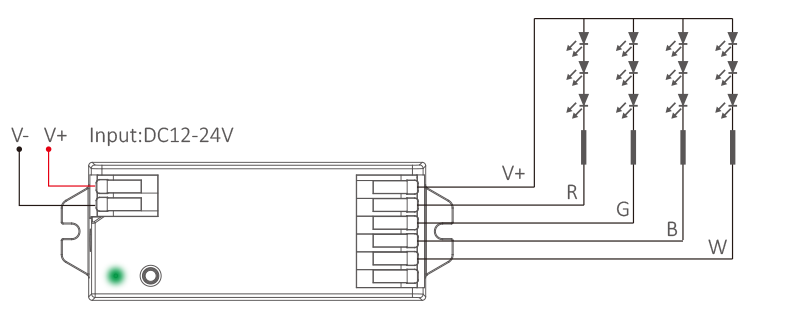
For RGBW led strip (short press “SET”–green indicator)
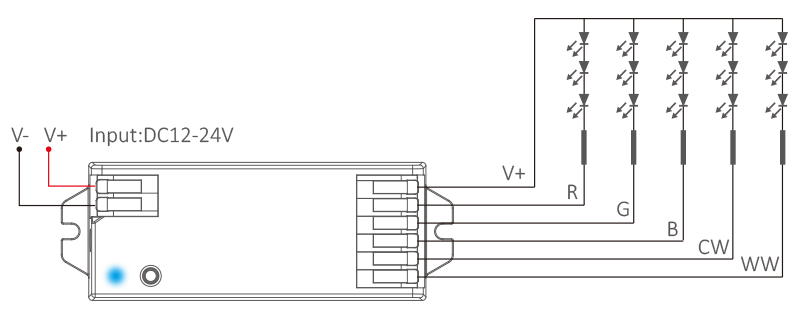
For RGB+CCT led strip (short press “SET”–blue indicator)
Output mode settings #
Short press (SET) continuously to select output mode, indicator displays different output modes as following diagram.
| Indicador | Saída |
| White | Single color |
| Yellow | Dual white |
| Red | RGB |
| Green | RGBW |
| Blue | RGB+CCT |
Setting PWM frequency #
Long press “SET”until indicator flashes, short press “SET” continuously to select PWM frequency.
| Lowest | Flashing slowly | Flashing quickly | Fastest |
| 250Hz | 2KHz | 4KHz | 8KHz |
frequência PWM (changing different frequency to solve the noise problem from power adapter).
High frequency only support device with lower wattage, low frequency support device with higher wattage and have better dimming performance. Factory default PWM frequency is 4KHz.

Dynamic Mode List (For remote control only) #
Atenção: brightness, saturation and speed are dimmable
| No. | Dynamic mode |
| 1 | Automatical color changing |
| 2 | RGB gradual changing |
| 3 | Color changing randomly |
| 4 | Seven color jumping |
| 5 | Color jumping randomly |
| 6 | Volcano red |
| 7 | Forest green |
| 8 | Ocean blue |
9 | Three color jumping and gradual changing |
Mini brilho #
- Pressione e segure “
”" ou "“
” 6S em qualquer zona de grupo até que a luminária pisque uma vez (desconecte-se automaticamente se o controle remoto não for acionado em 5S).
- Pressionar "curto prazo"“
”" ou "“
”"Na zona de grupo, configure 10 níveis de brilho diferentes (1%, 5%, 10%, 15%, 20%, 25%, 30%, 35%, 40%, 50%).
Pressione rapidamente qualquer botão, exceto “DESLIGAR”, para confirmar ou sair da configuração. O botão principal “DESLIGAR” configura todas as funções.
ON/OFF Time #
The light status changes gradually (factory default time is 0.5s).
1.5s: Short press “ON” 1 times and short press “OFF” 5 times within 3 seconds, the setting is done once light flashes 2 times slowly.
0.5s: Short press “OFF” 1 times and short press “ON” 5 times within 3 seconds, the setting is done once light flashes 2 times quickly.
Atenção #
- Por favor, desligue a energia antes de conectar o dispositivo.
- Verifique a voltagem do adaptador de energia antes de conectá-lo.
- Não desmonte se você não for especialista.
- Não utilize em áreas metálicas ou magnéticas.