
Características #
- This product is made by 2.4G wireless transmitting technology with low consumption and strong ability to resist signal loss.
- 5 kinds of output mode support 5 led strip (Single color/CCT/RGB/RGBW/RGB+CCT)
- Compatible con control remoto de 2.4G.
Parámetros #
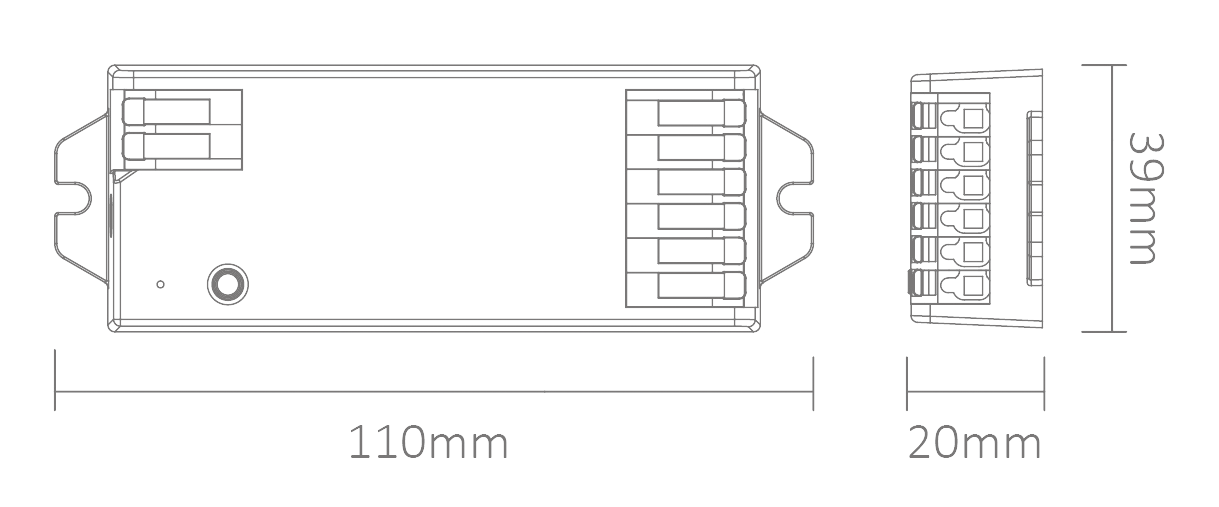
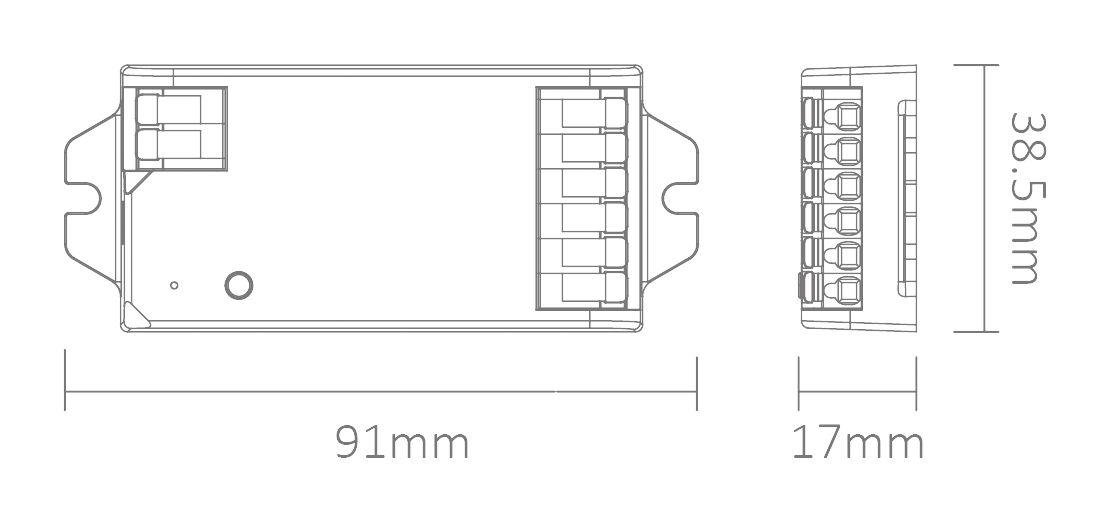
| Nº de modelo. | iH5 | iM5 |
| Nombre del producto | 2.4G 5 in 1 LED Controller (20A) | 2.4G 5 in 1 LED Controller (12A) |
| Aporte | DC12V-24V | DC12V-24V |
| Salida | 8A/Channel | 6A/Canal |
| Producción total | Max 20A | Máx. 12 A |
| RF | 2,4 GHz | WiFi+2.4GHz |
| Distancia de control | 30m | 30m |
| Temperatura de funcionamiento | -20~45°C | -20~45°C |
| Tamaño del producto | 110*39*20mm (L*W*H) | 91*38.5*17mm (L*W*H) |
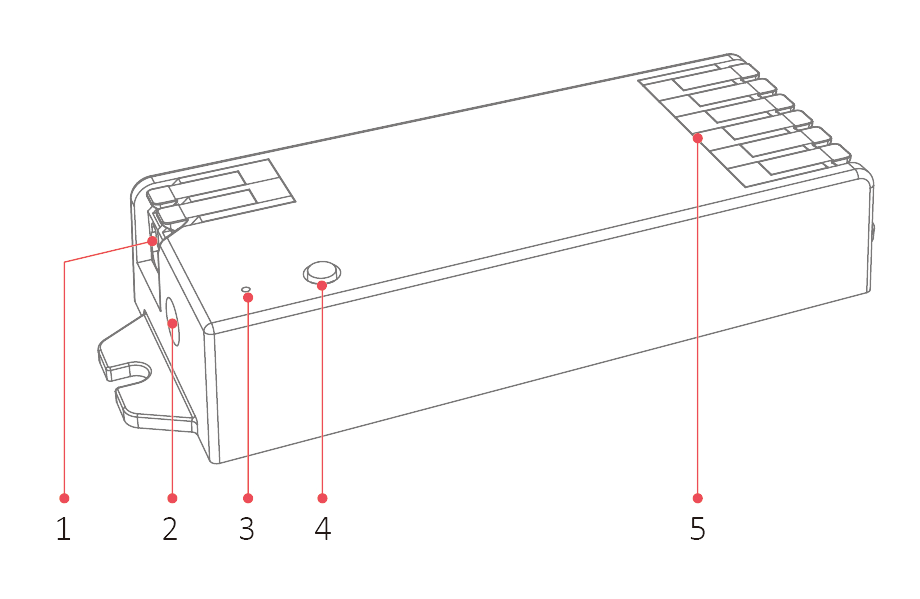
Input 1
Input 2 (DC5521 Max 10A)
Indicador
Botón SET
Salida
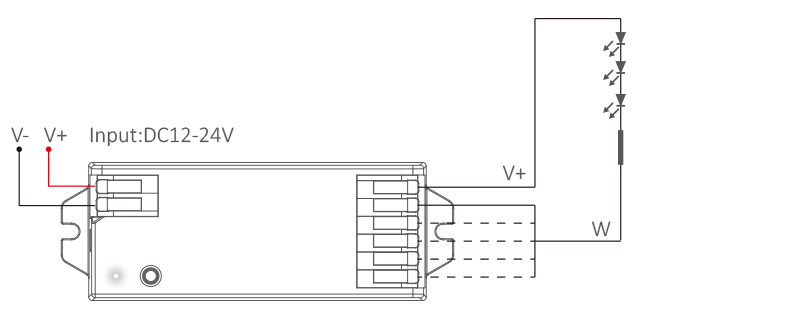
Diagrama de conexión #
Para tiras LED de un solo color (pulsación corta de “SET” – indicador blanco)
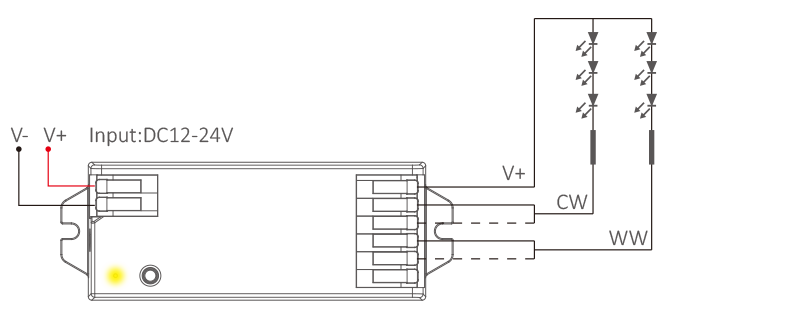
For dual white led strip (short press “SET”– yellow indicator)
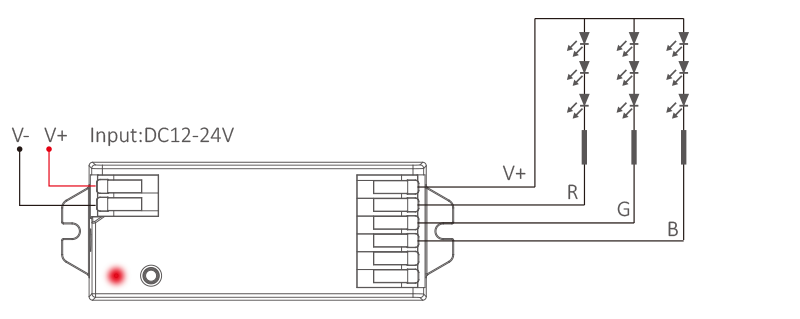
Para tiras LED RGB (pulsación corta “SET” – indicador rojo)
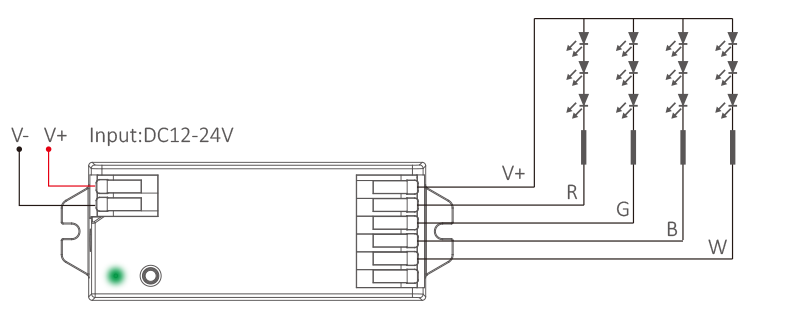
For RGBW led strip (short press “SET”–green indicator)
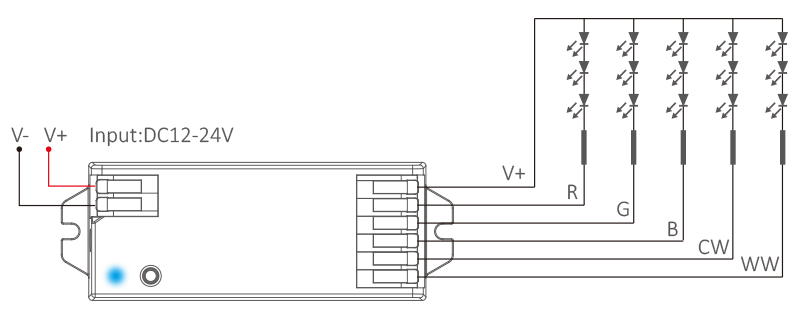
For RGB+CCT led strip (short press “SET”–blue indicator)
Configuración del modo de salida #
Mantenga pulsado (SET) brevemente para seleccionar el modo de salida; el indicador mostrará los diferentes modos de salida como se muestra en el siguiente diagrama.
| Indicador | Salida |
| Blanco | Un solo color |
| Amarillo | Dual white |
| Red | RGB |
| Green | RGBW |
| Blue | RGB+CCT |
Setting PWM frequency #
Long press “SET”until indicator flashes, short press “SET” continuously to select PWM frequency.
| Lowest | Flashing slowly | Flashing quickly | Fastest |
| 250Hz | 2KHz | 4KHz | 8KHz |
frecuencia PWM (changing different frequency to solve the noise problem from power adapter).
High frequency only support device with lower wattage, low frequency support device with higher wattage and have better dimming performance. Factory default PWM frequency is 4KHz.
Dynamic Mode List (For remote control only) #
Attention: brightness, saturation and speed are dimmable
| No. | Modo dinámico |
| 1 | Automatical color changing |
| 2 | RGB gradual changing |
| 3 | Color changing randomly |
| 4 | Seven color jumping |
| 5 | Color jumping randomly |
| 6 | Volcano red |
| 7 | Forest green |
| 8 | Ocean blue |
9 | Three color jumping and gradual changing |
Mini Brightness #
- Long press “
” or “
” 6S in any group zones until lighting fixture flashes one time (step out automatically if remote don’t be operated within 5S).
- Short press “
” or “
” in group zone to set up 10 kinds of brightness level ( 1%, 5%, 10%, 15%, 20%, 25%, 30%, 35%, 40%, 50%).
Short press any button except “OFF” to confirm or step out setting, the master “OFF”can set up all features.
ON/OFF Time #
The light status changes gradually (factory default time is 0.5s).
1.5s: Short press “ON” 1 times and short press “OFF” 5 times within 3 seconds, the setting is done once light flashes 2 times slowly.
0.5s: Short press “OFF” 1 times and short press “ON” 5 times within 3 seconds, the setting is done once light flashes 2 times quickly.
Atención #
- Por favor, desconecte la alimentación antes de conectar el dispositivo.
- Por favor, compruebe el voltaje del adaptador de corriente antes de conectarlo.
- No lo desmontes si no eres un experto.
- No lo utilice en zonas metálicas o magnéticas.