
Kenmerken #
- This product is made by 2.4G wireless transmitting technology with low consumption and strong ability to resist signal loss.
- 5 kinds of output mode support 5 led strip (Single color/CCT/RGB/RGBW/RGB+CCT)
- Ondersteunt afstandsbediening op 2,4 GHz.
- Built-in micro chip and support music rhythm
Parameters #
| Modelnr. | iM5V |
| Productnaam | 5 in 1 Sound to Light LED Controller (2.4G) |
| Invoer | 12 V DC - 24 V DC |
| Uitvoer | 6 A/kanaal |
| Totale productie | Max. 12 A |
| RF | 2,4GHz |
| Control distance | 30m |
| Bedrijfstemperatuur | -20 tot 45 °C |
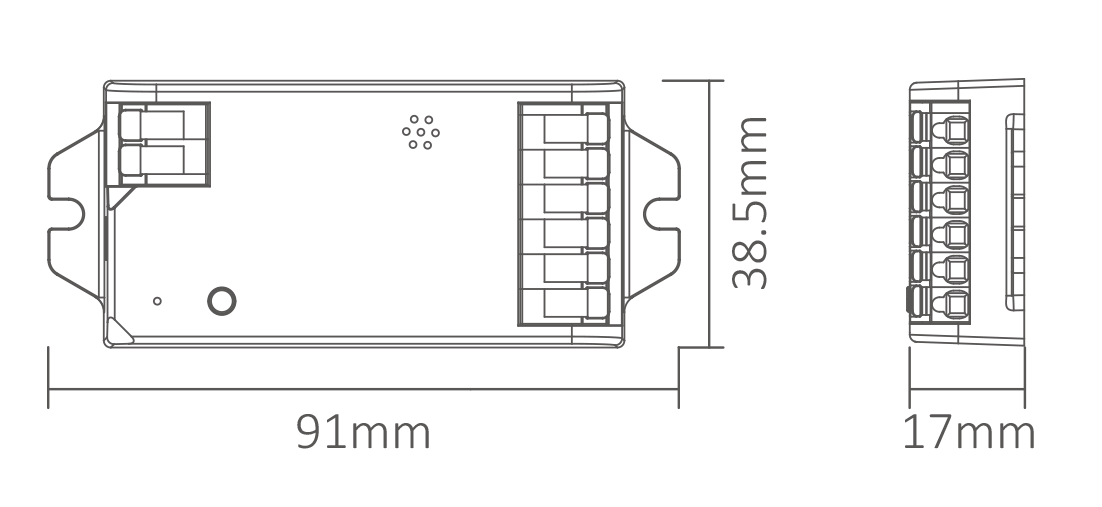
| Product Grootte | 91*38.5*17mm (L*W*H) |
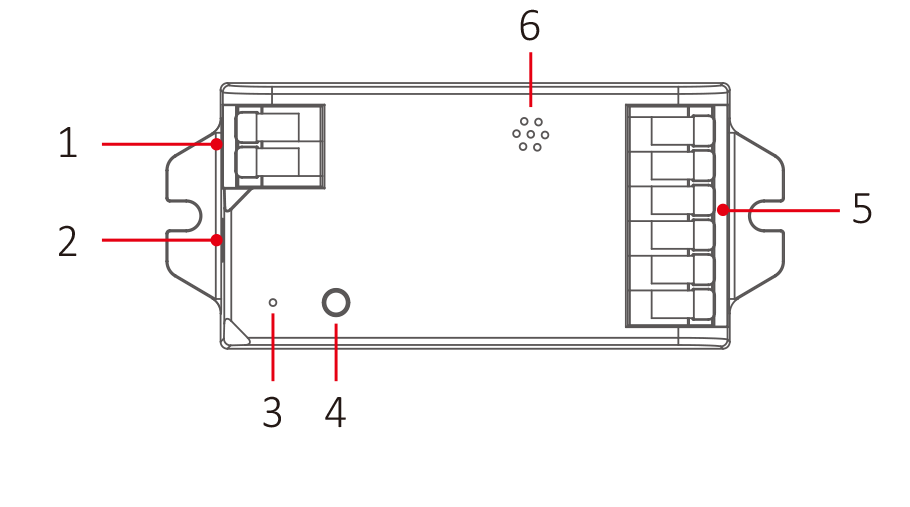
Invoer 1
Ingang 2 (DC5521, max. 10 A)
Indicator
SET-knop
Uitvoer
- Micro hole
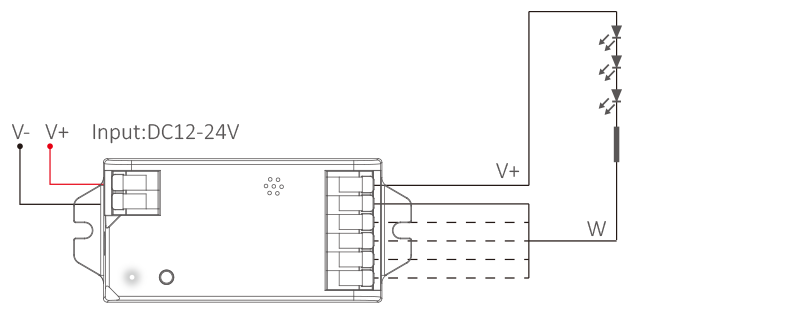
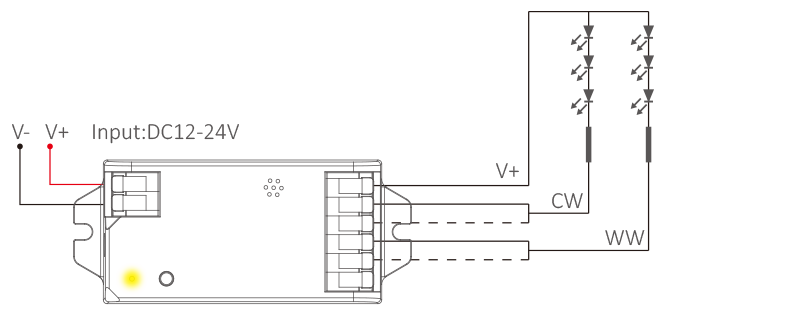
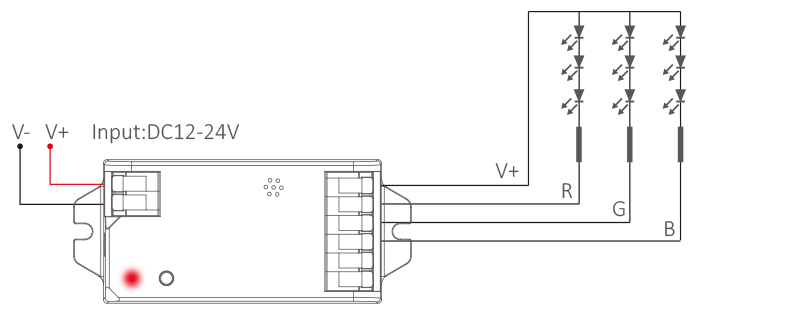
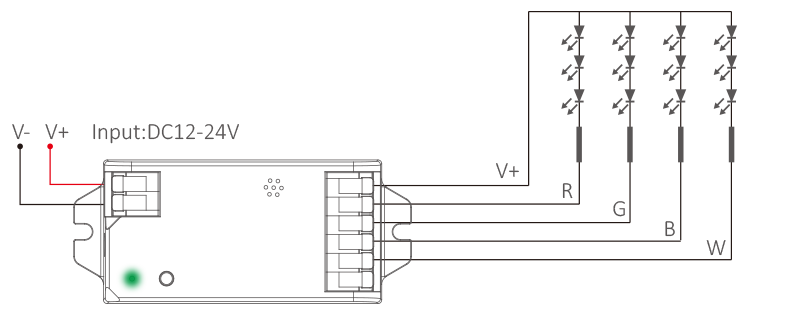
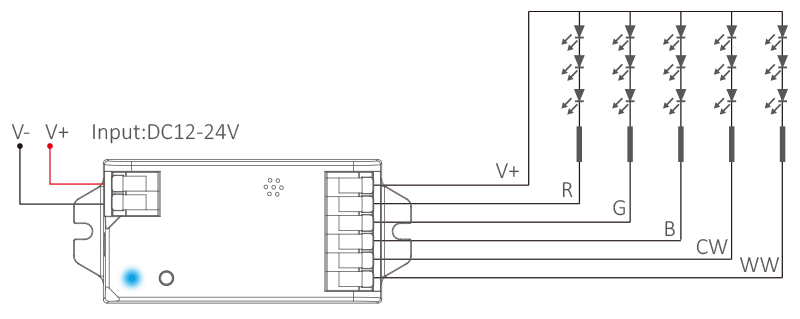
Aansluitschema #
For single color led strip (short press “SET”–white indicator)
For dual white led strip (short press “SET”– yellow indicator)
For RGB led strip (short press “SET”–red indicator)
For RGBW led strip (short press “SET”–green indicator)
For RGB+CCT led strip (short press “SET”–blue indicator)
Instellingen voor de uitvoermodus #
Druk kort en herhaaldelijk op (SET) om de uitvoermodus te selecteren; het indicatielampje geeft de verschillende uitvoermodi weer zoals in onderstaande afbeelding.
| Indicator | Uitvoer |
| Wit | Eén kleur |
| Geel | Dual white |
| Rood | RGB |
| Groen | RGBW |
| Blauw | RGB+CCT |
Setting PWM frequency #
Long press “SET”until indicator flashes, short press “SET” continuously to select PWM frequency.
| Lowest | Flashing slowly | Flashing quickly | Fastest |
| 250Hz | 2KHz | 4KHz | 8KHz |
PWM frequency (changing different frequency to solve the noise problem from power adapter).
High frequency only support device with lower wattage, low frequency support device with higher wattage and have better dimming performance. Factory default PWM frequency is 4KHz.

Lijst met dynamische modi (alleen voor de afstandsbediening) #
Let op: helderheid, verzadiging en snelheid zijn instelbaar
| Nee. | Dynamische modus |
| 1 | Automatische kleurwisseling |
| 2 | RGB geleidelijke verandering |
| 3 | De kleur verandert willekeurig |
| 4 | Zeven kleuren springen |
| 5 | De kleur verandert willekeurig |
| 6 | Vulkaanrood |
| 7 | Bosgroen |
| 8 | Oceaanblauw |
9 | Driekleurig springen en geleidelijke overgang |
Mini Brightness #
- Long press “
” or “
” 6S in any group zones until lighting fixture flashes one time (step out automatically if remote don’t be operated within 5S).
- Short press “
” or “
” in group zone to set up 10 kinds of brightness level ( 1%, 5%, 10%, 15%, 20%, 25%, 30%, 35%, 40%, 50%).
Short press any button except “OFF” to confirm or step out setting, the master “OFF”can set up all features.
ON/OFF Time #
The light status changes gradually (factory default time is 0.5s).
1.5s: Short press “ON” 1 times and short press “OFF” 5 times within 3 seconds, the setting is done once light flashes 2 times slowly.
0.5s: Short press “OFF” 1 times and short press “ON” 5 times within 3 seconds, the setting is done once light flashes 2 times quickly.
Music Mode #
Enter into music mode: Long press “M” button on remote until light flashes green color one time
Move out music mode: Long press “M” button on remote until light flashes red color two times
Warm Tips:
- Don’t block out the micro hole on controller.
- Don’t install it into sealed junction box.
Let op #
- Please cut off power before wiring device
- Please check the voltage of power adapter before connecting
- Don’t disassemble it if you are not expert
- Don’t use it in metallic or magnetic area